Loops
Loops will allow our programs to repeat the same action over and over. The
most general version of a loop is a while loop, but there are other specialized
loops such as for, which is used when we know how many times the loop should
run, and do-while, which is used when we know the loop must run at least
once. Like conditionals, loops are
controlled with boolean values; the statements in a loop are run repeatedly as long as the loops condition is true,
and stop when it is false. The
two most common types of loop errors are infinite loops, which never stop, and
no-loops, which never start.
While
The simplest version of a loop is a while loop. The keyword while
is followed by a boolean condition in parentheses, which must have been set up
before the loop. Inside the while structure
we put the sequence of statements that we want to repeat for as long as the
while’s condition remains true.
//statements to do no matter what
// need to set up the loop condition
while (boolean_condition) {
//statements to do as long as the condition is true //need to eventually change
the condition to false
}
//statements to do no matter what
When we reach the while in the execution of code, the
condition is evaluated. If it is true,
we run through all the statements inside the while structure, but if it is
false, we skip them and go on with the rest of the program. If it was true and we ran the statements, once
we reach the end curly, we then jump back and re-evaluate the condition to see
whether it is still true, and we keep doing this until it is false, and which
point we jump to after the end curly of the while
structure and go on with the rest of the program.
To picture this:
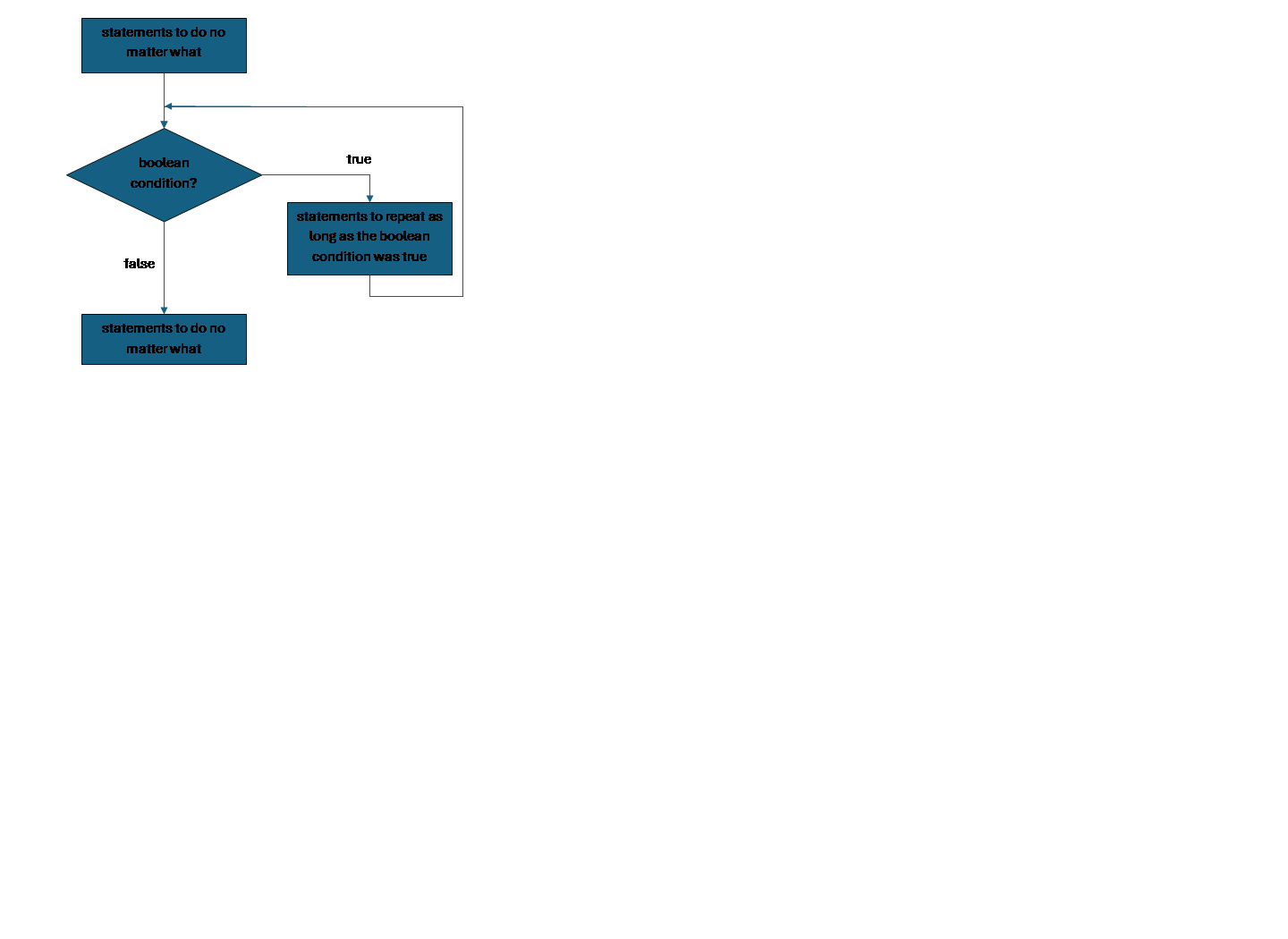
Here is a sequence of statements
int x = 0;
System.out.println(x);
x = x + 1; // x is 1
System.out.println(x);
x = x + 1; // x is 2
System.out.println(x);
x = x + 1; // x is 3
System.out.println(x);
x = x + 1; // x is 4
System.out.println(x);
We could describe this as “x starts as 0 and we want to
print x and add 1 to it, as long as x is under 5.
This code is tedious enough if we only go from 0 to 4. If instead we wanted to go from 0 to 499, it
would be horrendous!
Here is the loop version of the code above.
int x = 0
while (x < 5) {
print(x)
x = x + 1 //
x is 1 bigger than it was
}
x goes through the same values and gets printed each
time. Notice that if we want to change
this loop so that we count from 0 to 499, the code doesn’t get any longer, we
just write x < 500 instead of x < 5.
Notice also that computer scientists usually count from
0. It is not uncommon to translate
“computer scientist numbers” to “human numbers” when printing, in which case we
would just print x+1 each time (not change x’s value by an extra +1 each
time – that would change how the code works!).
It is important that the code inside the while structure can
change the value of the boolean condition and eventually make it false. In this case, we were checking for x < 5,
so we had code inside the loop to move x towards 5 by adding one to it each
time.
For this first example we were simply doing something a
certain number of times; actually we have a
specialized loop, the for, that we usually use for
such situations. We use while for other
situations: we often think of the code inside a while loop as either something
we want to keep doing, but can only do as long as the
condition is true, or else something we have to do as long as the condition is true, until we fix it. Either way, a while
is generally used when we do not know how many times we will have to run the
loop before it stops, called an indefinite loop. Any time our program is interacting with a
user, or other source of unpredictable input, we probably want a while loop.
In many cases, we would create a loop control variable,
to keep track of whether the loop should continue or not. We could think of the x above as a loop
control variable, but for while loops it is common for these variables to be
booleans. For instance, suppose we are
having the user guess our secret number:
int sekrit = 47 // the secret
number
int user = 0 // variable to hold the user’s guess
boolean done = false // they haven’t guessed right yet
// loop until they guess right
while (!done) {
user = prompt("guess? ")
if (user == sekrit) {
done =
true
}
}
print("you guessed
it!")
The boolean done keeps track of whether the user guessed or
not. If they did we are done, but until
then we are not done.
Notice that we put a conditional inside the loop; we can
always nest like this.
Notice also: while
always checks its condition for true, not false – it is a while loop not
an until loop. If it is easier to
describe the condition under which we want to stop, we just put a NOT in front
of it. We can use any boolean
expression, including relational and logical operators, as our loop condition.
In the case that there are various things that might happen
to cause the loop to end, having a single boolean like done is usually the
right approach.
However, in a simple situation like this, where the value of
done is always the same as the result of checking whether the user guessed the
secret number, we could put that check directly into the while (remembering we
want the loop to continue as long as we are NOT done)…
int sekrit = 47
int user = 0 // dummy value
// try as long as user has not
guessed
while (user != sekrit) {
user = prompt("guess? ")
}
print("you guessed
it!")
Notice that this loop depends on setting the user variable
to a starting value, 0, before the loop starts.
This starting value, sometimes called a dummy value, can be
anything but the one value (in this case 47) that would make the loop not start. It does not matter what other value we use
for the dummy value, because the first thing we’re going to do in the loop is
replace the dummy value with something we read in from the user.
Infinite Loops and No-Loops
An infinite loop is one that can start, but which
then runs the statements inside the loop forever and never continues
with the rest of the program.
One way an infinite loop could happen is that we simply
wrote a condition that can never be false:
while (x < 3 || x > 3 || x == 3)
{
x = x +
1
}
In this code, no matter what value x has, the condition will
be true, because every number is either less than, greater than, or equal to
three. This example is (hopefully) easy
to spot as a tautology – an expression that is always true. In your real programs you might end up having
to work your way through a truth table for your boolean expression to check
whether it can ever come out false.
Another way an infinite loop could happen is that the
condition never gets the chance to change inside the loop. In general, this will mean that the loop
control variable never has the chance to change.
x = prompt("guess?
")
while (x != 47)
{
// x doesn’t
change
print("guess again!")
}
In this code we got a value for x before the loop started,
but inside the loop, while we printed the words “guess again” we never actually
got a new value of x from the user. If
there is no code inside the loop that assigns the loop variable, that is a good
sign that we are having this problem.
But the problem could be more complicated, for example we might have a
statement that can change the variable, but that change is inside a conditional,
and the boolean for that conditional was written incorrectly so that it can
never be true.
Finally, we could change the condition,
but do so in a way that does not end the loop. For instance we
could change the value of the condition variable, but then change it back, or
we could change it in the wrong way
int x = 100
while (x > 0) {
x = x + 1
}
This code does change x, but x started at 100 and is going
to continue until it gets down to 0 or lower, so for the loop to end, x would
have to be decreased. Instead we are
increasing it. For another example
int x = 100
int y = 101
while (x < y) {
x = x + 1
y = y + 1
}
In this example, known as moving the goalposts, we
are changing both variables in the condition, so that although we update x to
move towards y, we keep moving y farther up at the
same pace.
If the boolean condition of a while
is false the first time we check it, we will simply
skip the statements inside the loop entirely and go on with the rest of the
program. This in
itself is not a problem. However,
if the way we wrote the condition means that it is never, under any
circumstances, true, then the loop might as well not be in the program, and
this problem is called a no loop.
while (x > 3 && x
< 3) {
x = x +
1
}
This code is a no-loop because there are no numbers that are
greater than and less than 3 at the same time.
Since the problem with a no-loop is that it never runs the code inside
the loop structure, the cause of the no-loop can only be the condition, not the
code inside the loop (obviously, this does not mean that the code inside the
loop is correct, just that it isn’t causing the no-loop).
Menus and Submenus
Historically, most programs were menu-driven. The user was given a list of options called a
menu, and entered a number or letter to choose which option to do, which often
led to another submenu of options contingent on the user’s choice, and so
on. Each menu would repeat until the
user chose to quit, and then they would be back at the previous menu, until
they quit out of the first menu and ended the whole program.
Modern programs are much less likely to be menu driven; we
tend to now give the user access to everything the program can do all at once,
and they can use the tools in any order.
However you have probably used a menu-driven
system when buying gas at the pump, or using an ATM, and many programs have
portions that are menu-driven when we need the user to go through a certain
list of steps with options in the right order, to do some task
within the program.
Menus also are an excellent way to practice writing loops
because they are so interactive for testing.
Here is a basic menu:
double balance = 1234.56
// variable for user’s choice of menu option
int menuOp = -1 // start with
dummy value
print("Welcome to the
bank");
// loop until user enters 0 to quit
while (menuOp != 0) {
// show user
the options
print ("0
Quit")
print ("1
Show Balance")
print ("2
Deposit")
print ("3
Withdraw")
// get user’s
choice
menuOp = prompt("Enter your
choice: ")
// conditional
structure for different options
if (menuOp == 1) { // show balance
print ("$"
+ balance)
} else if (menuOp == 2) { // deposit
balance =
balance + 5
} else if (menuOp == 3) { // withdraw
balance =
balance - 5
}
} // end of menu loop
print ("Thank you for banking with us! Goodbye")
menuOp was our loop control
variable, and we set it to a dummy value so that the loop could start; the only
value we could not set it to was 0, since that was the value
we used so the user could signal they wanted to
quit.
We printed the options inside the loop, because it usually
helps the user to show them what their choices are every time. Then we got the user’s actual choice by
prompting. An if-else-if structure allows us to do the appropriate behaviors
based on user choice.
Notice that there is no check in the if-else-if
for 0. While we could put in a check for the quit value inside the loop if we
wanted to check if the user is sure they want to quit, we don’t need that if we
are just going to let them quit.
Anything that happens after they choose to quit can just go after the
end of the loop.
Notice also that there is no check for invalid values. We could add one, if it is important to scold
the user for mis-typing, but as written, since we have no final else, if they
give a bad value we will just do nothing and loop back around to show them the
menu again, which is probably enough to remind them what the valid entries are.
Here is an example with a submenu, which requires nesting
one while loop inside another, the simplest version of
a nested loop.
double balance = 1234.56
double savingsBalance =
9876.54
int menuOp = -1; // user
chosen option starts with dummy value
// until user chooses quit
while (menuOp != 0) {
print ("0
Quit")
print ("1
Show Balance")
print ("2
Deposit")
print ("3
Withdraw")
print ("4
Transfer Menu")
menuOp = prompt("Choice?
")
if (menuOp == 1) { // show balance
print ("$"
+ balance)
} else if (menuOp == 2) { // deposit
balance =
balance + 5
} else if (menuOp == 3) { // withdraw
balance =
balance - 5
} else if (menuOp == 4) { // submenu
int tMenuOp = -1 // user option for this menu
// until
users quits this menu
while (tMenuOp !=
0) {
print
("0 Return to main menu")
print
("1 Transfer from Savings")
print
("2 Transfer to Savings")
tMenuOp = prompt ("Choice? ")
if (tMenuOp == 1) { // transfer from
balance = balance + 5
savingsBalance = savingsBalance -
5
}
else if (tMenuOp == 2) { //
transfer to
balance = balance - 5
savingsBalance = savingsBalance +
5
}
}// end
submenu
}
} // end menu
The submenu (lines 25-42) gets its own while loop and its
own loop control variable, tMenuOp. It is important that this variable gets set
back to a dummy value before the submenu starts. Otherwise, once we have quit the submenu
once, we can’t return to it because the variable would still have the quit
value from the last time the user quit.
For this reason, we generally just create and initialize each submenu’s
control variable right above the submenu.
The code inside the submenu is very much like what was in
the main menu. Notice that again we
don’t need a special option for the quit value.
When the user enters 0 to return to main menu, we will end the submenu’s
while loop, which means we will be back inside the big loop for the main menu,
which will just loop around again and show the main menu options.
We can have as many levels of submenu as we want. You can see how this sort of code would get
very long, especially if the options are actions more complex than one or two
lines. We really need a good way to
break up our code into named subtasks to keep it readable – methods will give
us this.
Menus are a common situation where using case makes sense instead
if if-else-if:
double balance = bankBalance()
double savingsBalance = savingsAccountBalance()
// main menu
int menuOp = -1
while (menuOp != 0) {
print("0 Quit")
print("1 Show Balance")
print("2 Deposit")
print("3 Withdraw")
print("4 Transfer Menu")
menuOp = prompt("Choice?")
// case to
handle user choices
case menuOp{
1:
print
"$" + balance"
2:
balance
= balance + 5
3:
balance
= balance – 5
4: // this
choice takes us to submenu
// new
loop control for submenu
int tMenuOp = -1
//
submenu’s loop
while (tMenuOp !=
0)(
print("0
Return to main menu")
print("1
Transfer from Savings")
print("2
Transfer to Savings")
tMenuOp = prompt("Choice?")
case
tMenuOp {
1:
balance = balance + 5
savings = savings – 5
2:
balance = balance - 5
savings = savings + 5
}
} // end
of submenu
// when
submenu ends, we are still in main loop
} end of case
} end of while
Sentinel Values
Suppose we are getting values from a user, each of which we
have to do some processing on, but we don’t know how many there will be. One option is to ask the user how many; then
we could use a for loop which is designed for such situations. But what if the user doesn’t know how long it
will take either?
One approach is to have two inputs, one for data, and one
for whether the loop should continue.
Here is an example that does an average:
int sum = 0 // adding up the entered numbers
int count = 0 // how many numbers
int current // will hold user’s current number
string ans = prompt("Is there another number (y/n)? ")
while (ans == "y") {
current = prompt("What
number? ")
count = count
+ 1
sum = sum +
current
ans = prompt("Is there
another number (y/n)? ")
}
// should really check for count == 0 first
print("average: " +
sum / count)
To use this code, the user has to
alternate between entering “y” and the data.
Most people find using a program with this kind of input frustrating
because it feels like doubling the length of the task, and also it is easy to
get off-rhythm and accidentally enter a “y” when it should have been a number
or a number when it should have been “y”.
We can instead let the user just enter data, but use a
special value to indicate that we need to stop.
This is called a sentinel value.
We often create a constant to hold the sentinel.
Here is the average code with a sentinel:
int sum = 0 // adding up the entered numbers
int count = 0 // how many numbers
constant int STOP = -989 // a constant
print("Enter " +
STOP + " to quit")
int current = 0 // anything but STOP (could use STOP-1
or similar)
// loop until user enters STOP
while (current != STOP) {
current = prompt("What number? ")
// only
process the data if they enter valid data
if (current != STOP) {
count =
count + 1
sum = sum
+ current
}
}
print("average: " +
sum / count)
With this code, the user only has to
type data, and when they are done, type the sentinel value, -989
and the loop will stop. Note that in
this version, we read the value in at the top of the loop and then we needed to
use a conditional to make sure that we did not treat the sentinel value as if
it were part of the date. To support
reading at the top of the loop, we also started off by giving current a dummy
value to start the loop, and then replaced it when we got into the loop.
Here is a version that avoids the extra if, but it reads
input twice, once before the loop and once at the bottom, so each time through
the loop we process data, and then read in a value, which some people find hard
to read.
int sum = 0 // adding up the entered numbers
int count = 0 // how many numbers
final int STOP = -989 // sentinel
print("Enter " +
STOP + " to quit");
int current = prompt("What
number? "); // first number
while (current != STOP) {
count = count
+ 1
sum = sum +
current
current = prompt("What number? ") // first number
}
print("average: " +
sum / count)
Whichever way around we get the data, we have made sure we
never included -989 in the calculation of our average. But what if -989 is one of the numbers the
user wanted to use? The major limitation
of the sentinel method is that we can only work with a sentinel value if there
is at least one possible value that is not valid data for the task we are
doing.
If what we want is to accept all possible ints, we could
take in our data as doubles and tell the user to enter something like 0.5 to
stop, and then cast all the whole number doubles to int. This would work, but the time spent
converting from double to int is a little inefficient, and what about if we
want to accept all doubles? What if we
are doing something besides math and want to accept any input the user
can type? Then we are back to the fundamental
limitation of the sentinel value method: there has to
be at least one string we don’t accept as valid to be able to use a sentinel
value.
Do-While Loops
A do-while loop is
designed for the case where we must always do the code in the loop at least
once, even if we don’t repeat it again after that. This is also called a post-test loop, because
it checks its boolean condition at the end of the loop instead of the
start.
A do-while begins with the keyword do, then has the code we
want to repeat, and ends with the keyword while and, in parentheses, the
boolean condition that is true as long as we want to
repeat the do-while code.
statements to do no matter what – need to set up the
loop condition
do {
statements to do at least once
and repeat as long as the condition is true – need to
have the opportunity to eventually change the condition
} while (boolean_condition)
statements to do no matter what
do-while loops are often used for input validation. Defensive programming is the practice
of writing programs that proactively assume that input values may be invalid;
one good basic tool is to include validation loops every time we get
user input. Since we have
to get the input once anyway, but then may have to repeat if the input is bad, this is a good
use for a do-while.
double income
do
income = prompt (“income? (value cannot be
negative)")
while (income < 0)
This code reads in the user’s income, but if they give a
negative value, makes them keep trying. Notice that in a do-while, they see the same
prompt every time, even after giving an invalid answer. If we want to give a different prompt to tell
them their previous answer was wrong, we’d have to nest a conditional inside
the do-while. A validation loop with a
normal while would allow us to add this alternative prompt more naturally:
double income = prompt(“income?
(value cannot be negative)")
while (income < 0) {
print(income + " is negative, please try again")
income =
prompt(“income?")
}
So it depends on how important it
is to add extra clarifications when the user gives us a bad response.
For Loops
A for loop is
designed for the very common case where we need to do the code inside the loop
a certain number of times, a definite loop, also known as a counter controlled loop.
Suppose we try to use a while loop to do a counted task:
int count = 0 // initialize counter
while (count < 10) { // check counter
print("#" + count)
count = count + 1 // update
counter
}
Other than the actual task for the loop-- printing-- the things we had to do to make this
loop work were:
initialize the counter, check the counter in the condition, and update
the counter so that the loop can eventually end.
A for loop collects these three standard parts of counting
in a loop and puts them all on one line at the top of the loop. This makes it easy at a glance to see where
the loop starts, how long it keeps going, and how the counter changes. Here’s the same code in a for, but with the
three parts on different lines:
for (int count = 0; // initialize counter
count < 10; // check counter
count = count + 1) { // update counter
print("#"
+ count)
}
But the head of a for loop is
almost always written on a single line:
for (int count = 0; count < 10; count++ )
{
print("#" + count)
}
The keyword for has parentheses containing: a statement that
initializes the loop variable, then a boolean condition, then a statement that
changes the loop variable, with semicolons as separators. Like other structures, it has curly braces
around the body, and in the body of the loop we have the statements to be
repeated as long as the condition is true.
When the for loop is executed, the initialization statement
runs once, before the loop starts. Then
the boolean condition is evaluated. If
the condition is false, we skip the loop and go on to the rest of the program,
but if it is true we run the statements inside the loop structure. When we reach the end curly, we come back and
evaluate the update statement, and then check the boolean condition again, and
if it is still true, repeat the loop code.
A for loop can technically put any statement in the
initialization and update positions, and any boolean as its condition, so we could
do anything with a for loop that we could do with a while loop, but that’s
seldom useful. Most of the time for
loops have the same parts: set a counter to an initial value, check the counter
against a bound, update the counter by an increment:
// initial value 0, upper bound 10, increment 1
for (int count = 0; count < 10; count++) {
// things to
do while counting from 0 to 9
}
Most of the time we start at 0 and count
up by incrementing the counter, but the math could be different:
// initial value 100, lower bound 10, decrement 5
for (int count = 0; count > 10; count = count - 5) {
// things to
do while counting down from 100 by 5’s
}
Code inside a for loop often makes use of the value of the
counter, but it is usually a very bad idea to change the value of the
counter inside the loop. Programmers are
used to being able to look at the top of the for loop and know how long the
loop runs; if something inside the loop can change that, the for loop is much
less readable.
But what if we are writing a loop for a situation that is
mostly definite, depending on the value of a counter, but somewhat indefinite,
because under some situations it could end early? What if we need to go through
1000 values, but if we find what we were looking for we can stop? We want to end early
if we can!
It is tempting to
have a conditional inside the loop that just jumps the counter ahead to the
end, but this makes the code hard to follow.
Instead, we can simply change the boolean condition: although most for
loops just compare the counter to some bound, we can put any boolean
expression in a for, so we can use logical operators
like AND and OR to describe in more detail how long
the loop should repeat.
boolean doneEarly = false //
loop control
// loop happens 1000 times but could end early
for (int i = 0; i < 10000 AND !doneEarly;
i++) {
// things to do 1000 times
// add in a
conditional to check if we are done early
// and if so change the loop control
}
Since for loops are just a special loop for counting, they
could also have infinite and no- loop problems just like while loops, if we
don’t write the parts of the for loop to cooperate with each other, like having
a for loop that is supposed to count up to a bound, but decrements the counter,
for example.
Nested Loops
We can put structures inside other structures to create more
complex code. Putting a conditional
inside a loop is a very frequent construction.
A while with an if inside means that we are repeatedly making a decision. A
for loop with an if inside means we are making a decision
a certain number of times. We can also
put an if outside a loop in order to choose whether or not to even consider doing the loop at all.
We can also nest a loop inside another loop. We would talk about the “outer loop” and
“inner loop” or “big” and “little” loop.
A common simple example of this was putting one while menu loop inside
another.
Tracing through nested for loops
should help understand how nesting works for loops that are more complex:
for (int i = 0; i < 3; i++)
{
print("i is " + i)
for (int j =
0; j < 4; j++) {
print ("("
+ i + " " + j + ")")
}
}
This prints:
i is 0
(0,0)
(0,1)
(0,2)
(0,3)
i is 1
(1,0)
(1,1)
(1,2)
(1,3)
i is 2
(2,0)
(2,1)
(2,2)
(2,3)
First thing to notice: after (0,0)
the next pair is (0,1) not (1,1)
because j is still less than 4. We have to finish going all the way through the inner (j) loop
before we will get back to the outer (i) loop and be
able to update i.
Second thing to notice: After (0,3)
we have finally finished the inner (j) loop so we finally update i and get i is 1, and after that (1,0),
not (1,4) because when we re-started the code in
the body of the outer (i) loop, this included
creating a new j variable starting at 0.
Remember that variables only exist in the scope where they were created,
so the previous j was thrown away when we completed the inner (j) loop for the first
time.
So, when we nest a loop inside another loop, each trip
through the outer loop restarts the inner loop from scratch, and then we have
to finish the inner loop entirely before we finish that iteration of the outer
loop.
If the outer loop is a while loop and the inner loop is a
for loop, that means we don’t know how many times we will do something, but
each time it will involve a known number of repeats. If the outer loop is a for loop and the inner
loop is a while loop, that means we are doing something a certain number of
times, and each time there is a step we don’t know how many times we have to
repeat.
Break and Continue (are bad)
You may sometimes see examples of the keywords break and continue in some
languages; these allow the program to act in a way that does not respect the
loop structure. Break ends the loop
early, ignoring the value of the boolean condition that is supposed to control
the loop. Continue skips
statements inside the loop and jumps back up to
re-evaluate the condition immediately.
Just like goto, break and continue
usually make code more complex for very little reward. Using break and continue in loops is
generally done by beginners just to avoid having to figure out how write slightly
more complex loop logic at the cost of code that is harder to read, debug,
maintain, and update. Do not use them
for this course, I will just mark them wrong.