Basic Programming Concepts
Hardware and Software
A working computer needs both hardware – the physical components – and software – the programs that tell the hardware what to do.
The most essential parts of the hardware we need are processing and storage. For the computer to be usable, we also need input and output – ways for humans to communicate with the computer.
The Central Processing Unit (CPU) of a computer has electronics set up to perform operations such as arithmetic and logic, as well as other tasks; people often think of the CPU as the “brain” of the computer.
The primary storage for running programs is the Main Memory (MM)[1]; it stores the data and instructions of the current task. Since the computer is an electronic device, the simplest way to store things in the computer is to have a circuit that either does or does not have electric power. Power off represents storing a 0 and power on represents storing a 1. To store numbers larger than 1 we need to go to multiple digits. A line of these circuits in a row is called a binary pattern; everything in the computer is stored as a binary pattern.
A program consists of a list of instructions and data. Instructions are the binary patterns we use to represent the operations we have built into the electronics of the CPU. Data is anything else – other than instructions -- stored in the process of doing a task in the computer. Data includes anything the program starts with, anything read in (for instance from a user or a file), any interim values calculated, and any results.
Since there are a limited number of binary patterns of a given length[2] the same binary pattern may be re-used, sometimes as a number, sometimes as an instruction, sometimes as a character, sometimes as part of a color, etc.
Main memory can store millions of binary patterns, so we need some way to keep track of where things are. Each row in memory that can store a pattern is numbered, and this number is called the Memory Address. Getting a stored pattern is called reading, changing a stored pattern is called writing.
|
Memory Address |
Binary Pattern |
|
… |
… |
|
100 |
0000101011110000 |
|
101 |
0101001101011001 |
|
102 |
1010110100100111 |
|
103 |
0110101000000010 |
|
104 |
0000101011110000 |
|
105 |
0000000000000000 |
|
… |
… |
Getting data and instructions into the computer is input, and any results given back to a user is output. Input and output generally require converting between some other format and binary patterns.
Programs
Machine Language Programs
The machine language of a computer is the list of all the instructions this computer’s CPU can perform.
If we look at a real, running program in MM, we would just see a list of binary patterns.
Inside the CPU we need a little bit of storage for the current instruction and the data we are working on right at this moment. Storage areas in the CPU are called registers. There is one instruction register and several data registers.
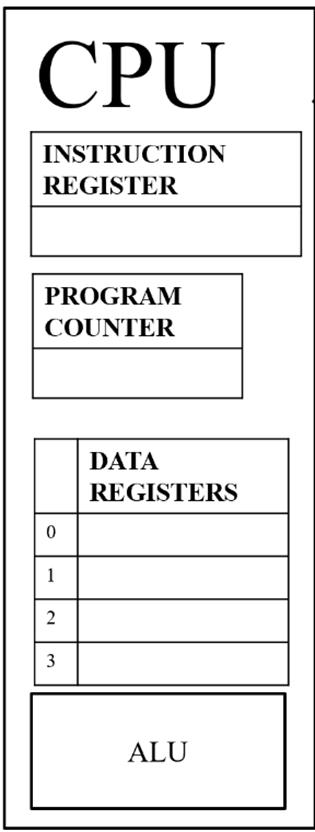 The Arithmetic Logic Unit (ALU) of a CPU
can generally do basic arithmetic on binary numbers, and also
logical operations such as checking equality -- whether two binary patterns are
the same.
The Arithmetic Logic Unit (ALU) of a CPU
can generally do basic arithmetic on binary numbers, and also
logical operations such as checking equality -- whether two binary patterns are
the same.
At the level of machine language, we have to break down what we want the program to do into things we were able to figure out how to build electronic circuits to do, which is a fairly simple list of options.
This means that the work of a programmer is all about figuring out how to solve a problem -- write a program to do a task -- by combining a list of fairly simple tools. For instance, historically many CPUs had circuits to do adding, but building in multiplication was too complex and expensive, so if your program involved multiplication, you would have to write your program to add over and over to achieve that result.
The CPU can move data around in MM and between MM and the data registers. It does also need to be able to interact with the rest of the hardware, so that we can save files to or from a hard drive, or show images on a screen, or send data over a network, but all of these basically boil down to moving data around, and the CPU has instructions for this.
A program will usually consist of millions and millions of instructions, so the CPU needs a way to keep track of which instruction it is on while a program runs. The Program Counter (PC) is the component of the CPU that keeps track of the Memory Address of the current instruction; it automatically updates by one after each instruction is completed, so if the CPU has just completed the instruction at Memory Address MM99 it will next do the instruction at MM100.
A human would expect that the step after 99 is 100, but the CPU has to be built with hardware to make this happen because it is not a thinking person, it is just a mechanism. This is just one example of how much detailed work and thought has to go into designing a computer to complete tasks.
To allow a program to have different behaviors depending on circumstances, such as performing one of two options, or repeating the same operation, the CPU has to have instructions that can change the Memory Address in the PC so that the next instruction executed is not the next numerically.
For instance, if we have just done the instruction at Memory Address MM99 and we now need to repeat the last 9 instructions, the next instruction in the program might set the PC back to MM90, creating a loop. And so that the CPU can eventually leave this loop, there would have to be the possibility that it will instead set it forward to jump elsewhere to do other instructions.
Assembly Language
Few programmers want to write code in binary.
Although everything at the hardware level is in binary, even when we are talking about hardware most people find working in binary unnecessarily difficult. Assembly language is a programming language that uses human-friendly codes that stand for machine language instructions, for example ADD for the instruction that tells the ALU to add binary numbers. Each statement in an assembly language program represents one machine language instruction.
Note that assembly language programs would be stored in the computer using the binary for the letters and numbers in them, which are not the same as the binary for the instructions they represent[3] So an assembly program cannot run; it would have to be translated to machine language first; a program can easily do this however, since translating assembly is just a matter of looking up each assembly code and replacing it with the equivalent machine language binary.
There are actually various assembly languages for different types of CPU. here I’ll use a very simplified version to give you an idea. In most assembly, the code for the action, the operator, comes before any data it acts on, called operands. This style is called prefix notation. You are probably more used to infix notation, which puts the action between two data elements. So if my operator is ADD and my operands are 70 and 180:
Prefix style: ADD 70 180
Infix style: 70 ADD 180
Suppose we want the computer to add two numbers for us. The Arithmetic Logic Unit in the CPU has logic gates wired up to combine the 0’s and 1’s of two binary numbers to achieve the right binary pattern for their sum. So, to tell the ALU’s adder (component that does adding) to combine the binary pattern for 70 with the binary pattern for 180 we could start by saying:
ADD 70 180
But do you see why this isn’t enough? This says to add the two numbers, but surely we did that because we wanted the result! So we need to say something about where to put the result or what to do with it.
Important principle: Always use the result of an operation. You might store it for later, you might immediately do another operation on it, you might print it for the user to see, but you should never do an operation without doing something with the result! If you don’t, that operation was a waste of time.
So, the ADD instruction actually needs not two but three operands; the third is the location to put the result. Main Memory is our storage for currently running programs, so we probably want to put our result in MM[4] and we need to specify which row in MM to put it into so that we can find it again later to use. We can specify the row in MM by putting MM in front of the memory address (the row number). So
Says to add 70 and 180 and put the result in MM, on row 105.
People often ask, “How does CPU know this means to add 7 and 18 and put the result in MM105, instead of adding 7 and 18 and the data in MM105 all three together?” Well, first, the assembly language codes are just for our convenience; they have to be translated to machine language in order to run. To make it easy to do that translation (and easy for us to write) we just always use the same order to mean the same thing.
But also remember that the CPU doesn’t know anything. The CPU is a bunch of logic gates wired together in a specific way. The actual machine language binary code for this instruction has ons and offs in the right locations to send power down some wires and not others. Some of those wires activate the parts of the ALU that does adding, some of those wires carry the numbers into that adding component to be added, and some of those wires activate the connections coming out of the ALU so that when the adder has resulted in a binary pattern, those ons and offs are sent to the right place to store the result.
Actually a modern CPU has such a complex structure that just wiring its components directly from the instruction register is insufficient, and a secondary structure called the Control Unit just to decode instructions so that the right parts of the CPU are activated based on different types of instructions is required. We would often say that the Control Unit “knows” or “figures out” what the instruction is telling the CPU to do, but actually, it is just another layer of mechanism that very clever people spent a lot of time and energy figuring out.
There is no thinking and no knowledge going on in the CPU, the thinking is our job!
But if thinking is our job, we probably think that this example seems like a silly thing to have the computer do. We know what 70 + 180 is, so why have the CPU do this when we could just have put the binary pattern for 250 in MM on line 105 in the first place? Instead of explicitly using those numbers, we probably want our program to use values that it might have read in from the user or a file, or calculated in previous steps. So instead of the literal values 70 and 180, we want to use stored data. When we are writing hardware programs, we use the memory locations where those values are stored. So now our statement might look like
ADD MM103 MM104 MM105
This says to add whatever data is currently stored in MM on row 103 to whatever data is currently stored in MM on row 104, and put the result back in MM on row 105. Since the values on row 103 and 104 might be different each time this ADD instruction runs, we could call MM103 and MM104 variables – they are representations of data that can vary instead of specific values that are always the same.
Important principle: Instead of using literal values, use variables. Using literal values limits what your program can do; using variables makes your code more flexible. Only use a literal value if you’re sure that part of the program’s behavior should never change.
Now, it might be that MM103 is the row in MM where I stored the data I read in from a file representing the company’s bonus per commission and MM104 stores the data I read in from the user representing their base commission on a sale, so the result is their total. The statement ADD MM103 MM104 MM105 has the right outcome, but we have to remember what it means. One thing a high level language gives us that makes it easier to use than assembly is named variables.
The Instruction Cycle
To run a program, the computer must do all the instructions in the program. The process of doing a single instruction in a program is called an instruction cycle. The Instruction Cycle is a four-stage process that the CPU repeats over and over. The stages are: Fetch, Decode, Execute, and Update. Since this is a cycle, after each Update the CPU continues on to the next Fetch.
The purpose of the cycle is to complete an instruction. The Execute stage is where the instruction is actually carried out. During Fetch and Decode, the CPU prepares for Execute, and during Update, it prepares for the next cycle.
In fact, the instruction cycle is the only thing the CPU ever does, from the time the computer is turned on until it is turned off. The CPU doesn’t even know about programs. It simply does the Instruction Cycle process over and over again.
For a program to run, its instructions and data must be stored in Main Memory, and the Program Counter must be set to the Main Memory address of the first instruction. Then the CPU does the instruction cycle over and over for all the instructions in the program.
Fetch
The CPU can only execute an instruction that is in the instruction register. So the first stage, Fetch, is to copy the instruction to the IR. But with potentially millions of instructions in MM, how does the CPU know which one to fetch? This is the purpose of the Program Counter. The PC holds the MM address of the next instruction to fetch.
So, during Fetch, the address from the PC is sent to MM, which sends back whatever instruction is at that address. This instruction is copied into the IR. Now the CPU has the instruction but it cannot act on it yet.
Decode
Once the binary pattern is in the IR, the CPU can set up to actually do the instruction. The ons and offs in the binary pattern activate some parts of the CPU and deactivate others in preparation to carry out the right task. In a modern CPU, the Control Unit deals with breaking up the parts of an instruction to activate and deactivate the correct parts of the instruction.
If the binary pattern copied to the IR turns out not to have been a valid instruction, the CPU must deal with the error. Generally, it would change the program counter so that the next instruction to be run will be the first step in the program that handles such an error.
Execute
Finally the CPU can do what the instruction says. What happens during Execute depends on the instruction. For some instructions, the ALU will be performing mathematical operations, for others, data will be copied over the bus, for others, the PC will be changed, or a request will be sent to the HD or... etc. etc.
The CPU does not check whether the instruction makes any sense from a human point of view. As long as the instruction is one of the ones built into the CPU, it simply does what it is told.
Update
Once the instruction has been executed, we are done with it. But we want the CPU to continue on to the next instruction in the program when we do the next cycle. If the CPU returned to Fetch immediately after Execute, it would be fetching the same instruction it just did!
During the Update stage, the CPU adds one to whatever value is in the Program Counter, so that on the next Fetch it can do the next instruction waiting in Main Memory.
This happens no matter what. The CPU can’t see what’s in Main Memory, so even if there isn’t a valid instruction at the next MM address, the CPU will still update the address by 1. This also means that if we want our program to change the PC to jump to some other point in a program, or some other program entirely, we’d have to have our instruction set the address to one less than where we want to end up, because the following Update will add 1 to whatever address we choose.
High Level Languages
Assembly Language gets us out of having to write code in machine language, but at the hardware level we still have to break down our programming tasks into tiny pieces like adding two binary numbers, moving a binary number around in the hardware, and changing the Program Counter. It is important to understand that all real programs do work this way! But few programmers are interested in having to think about all the hardware details such as Memory Addresses, or to break tasks into such tiny pieces.
Most programmers choose to work in a High Level Programming Language instead. These languages hide hardware details and give us more convenient tools to make programming tasks easier. Examples of high-level languages are C, C++, C#, Python, Javascript, Visual Basic, Perl, Lisp, and Java.
Different high level languages provide different tools and have different rules for how the code is written. We would expect most languages to provide
· tools for storing data
o individual values: named variables with types
o lists of values: arrays
· tools for doing arithmetic and logical operations
· control structures for affecting the order of instructions (changing the program counter)
o conditionals: choosing between options
o loops: repeating steps
· methods: a means of organizing part of a larger program into a named, re-usable component
· tools for input and output
· documentation tools, particularly comments – a means of adding notes to a program to make it more readable for programmers without affecting how the program runs
From these basic components, we can build programs to do complex tasks. High level languages may also give us more sophisticated tools for organizing our programs and controlling how data and actions are related, or lower-level tools that do allow us to use hardware details when they are helpful for problem-solving.
Java, for instance, is an extremely popular language because it provides a balance between ease of use and powerful tools. Other high level languages have advantages in one direction or another, for instance C++ is in many senses more powerful, but with the trade-off that many people find it more difficult to use.
Just like an assembly language program, a program in any high level language cannot run! The CPU can only run programs in machine language. Having to translate from high level to machine language ourselves would be annoying, especially since one line in a high-level language might be translated into dozens, hundreds, or thousands of machine language binary instructions. So we have programs to do this translation, but the task is much harder than in assembly, where each code is just a stand-in for a specific machine language code.
To make it possible to translate a high level language program, we must have simple, unambiguous rules for how to write programs in the language, rules simple enough that we can write the translation program. The rules of spelling, punctuation, grammar, vocabulary, etc, for a programming language are called the syntax.
It is very important for programmers to be able to learn
the syntax of a real language this; someone who can’t
bring themselves to care about the details of the syntax of a programming
language will struggle with programming!
In this course, we will learn a little bit of the syntax of the Java
language so that we can write programs that can run; it is hard to learn programming
concepts if you cannot experiment with them and watch how they work.
Compile and Interpret
There are two standard ways to translate from a high level language program to a machine language program that can run: compiling and interpreting. Any language could be either compiled or interpreted, but creators of a language tend to choose one approach or the other depending on which better matches their goals and all programs for that language are either compiled or interpreted.
For compiled languages, the original high level language program is given to the compiler program, which translates the whole of the program to machine language and saves this translation in a file called an executable. The executable is then given to the user, who can run it over and over again.
For interpreted languages, when the user wants to run the program, they give the original high level language program to the interpreter program, which translates it a little bit at a time while running it, every time it runs.
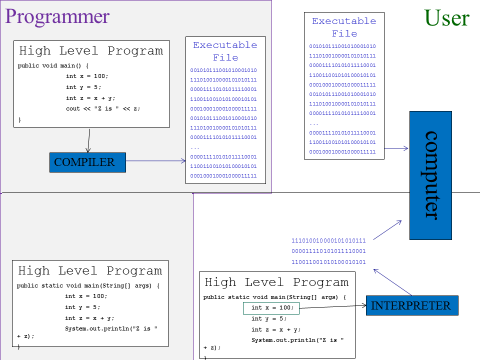
Note that the user would never need to have the compiler for a program written in a compiled language, only the programmer needs it; the user can run the program they’re interested in without needing an additional translation program. For an interpreted language, the programmer would still need to have the interpreter, to test their program, but the user needs this extra program as well.
Since all the translation has been done before the program is run, programs in compiled languages run faster than programs in interpreted languages, which have to be translated while they are run every time they run.
So far, all the advantages seem to be on the side of compiled language.
To understand the advantages of interpreted languages, consider that different types of computer have different machine languages. A Mac will not understand instructions for a Windows machine, and vice versa.
So, when we compile a program, we are compiling it for a specific type of computer. If we compile a program for a Windows machine, that executable will not work on a Mac[5]. However, if the program is in an interpreted language, then as long as the user has the interpreter on their computer, it will interpret into the correct language for the computer they have. This makes interpreted programs very portable, making them suitable for use in web pages which will be used by people on many different types of computer.
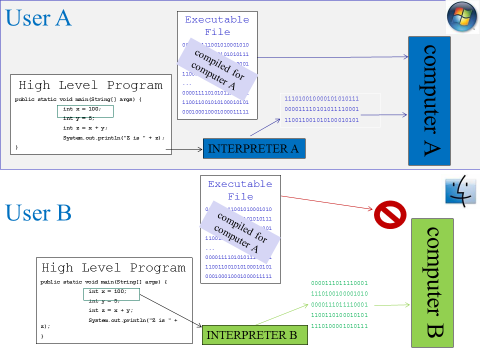
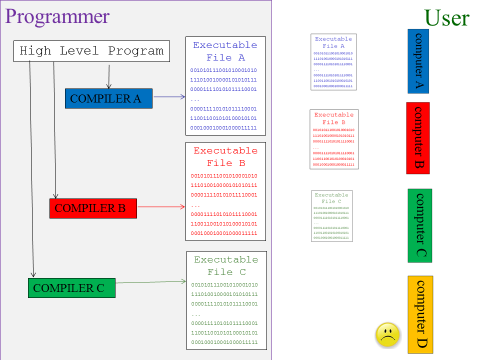
So, if a program is written in a compiled language, it will be our responsibility as programmers to compile different versions for different types of computer. This could take extra work, if there are details of working with a specific operating system that must be dealt with. In the case of interpreted languages, we only need to rely on users getting access to the interpreter on their own computer.
It is also true that because the compiler has to finish translating the whole program before we have an executable that can run, sometimes programmers prefer interpreted languages for creating simple tools for immediate tasks because they could avoid waiting through a long compilation process before they could test their program. However modern compilation can usually be done very fast for small-scale programs in such situations.
It also used to be that compiled programs were always much, much faster than interpreted, but now interpreted programs in some languages are almost as fast as compiled[6].
Historically, Java was an interpreted language, and during this time had a reputation for being slow for this reason. However, Java has since continued its tendency towards trying for balance by becoming one of the few languages that is both compiled and interpreted! A compile step translates the program from complex high-level language to hardware level instructions in a format of Java’s own, which is saved to a file; this intermediate format is translated to the actual machine language for a specific machine at run time. So the most time consuming part of the translation is done ahead, for speed, but translation is still done at runtime for portability.
In this course, we will learn the fundamental ideas of programs and programming, but Java is an example of how in the real world, our tools are often complex and take advantage of multiple of the ideas we talk about.
Pseudocode
Sometimes we want to describe step by step what a program does before actually writing the code in a high level language. Maybe we don’t want to have to think about the limitations of a real language while we’re solving problems, maybe we need to figure out the needs of a program before we can choose what language to work in, or maybe we’re just trying to explain a conceptual process.
A pseudocode is a structured, formalized way of writing down what a program will do, step by step. It has syntax rules, like a high level language, but is usually less specific and formal, and more descriptive and human-friendly. We will use a pseudocode for many examples and assignments.
An advantage of working in pseudocode is that you don’t have so many fiddly syntax details to worry about, in some cases parts of pseudocode might just look like a text description, as long as it describes in an unambiguous way what the program should do. A big disadvantage is that you can’t then run your pseudocode to check whether the process it describes actually works!
The Process of Programming
We often think of the process of writing a program as solving a problem – finding a way to get from some input to some desired output.
We could think of the steps in creating a program as
· Requirements
· Design
· Coding
· Translation
· Debugging / Testing
· Deployment
· Maintenance
There are also many other ways we could reasonably break this process down.
Modern models of programming always assume that we will do a certain amount of looping back: When testing, we will certainly find errors that will at least require going back to the coding phase and then working forward again, but some errors might reveal that our original design was flawed and has to be re-done, or even that we have to go back and revise our requirements to resolve a conflict or ambiguity. If we are luckier, we might realize problems with the design or requirements during coding and backtrack at that point.
Once we are in the maintenance phase, we might at any time have the requirements updated, or have to revisit coding or design because of a technical issue such as a library of someone else’s code that we relied on no longer being available.
Never expect that your journey through the programming process will be a straight line from start to end. In fact, never assume that the process of dealing with any program will necessarily have an end until that program is no longer in use by anyone.
Requirements.
You may sometimes have your own personal programming project where you define what the program should do, but most of the time you should expect to be creating a program to meet someone else’s needs.
Programmers are experts in writing programs, but they spend most of their lives doing this in the context of someone else's area of expertise. If you are writing a program for a chemist or an urban planner, you need to find out from them not only what the input and output look like and any formal calculations involved, but also vocabulary, best practices, processes, and so on used in their field.
People sometimes refer to “Engineer’s Disease” which is the assumption that if you are smart enough to become an expert in your field then you are automatically an expert in every field. This might result in ignoring important elements of a situation because you don’t see why they matter, or changing the order of steps because it seems more convenient to you. This leads to terrible programs that make people’s lives materially worse. Watch out for this: you’ll be the expert in writing programs, but you need to talk to an expert in the field your program is for, and you need to respect their expertise.
So, the first part of creating a program takes careful communication and negotiation to determine what the program needs to do and how it should work. A formal description of what the program is supposed to do is called the requirements.
Design
In the creation of a real program, the coding is the easy part. Learning enough about someone else’s field to create useful requirements is possibly the hardest. But what takes the most time and thought is program design, thinking through how you will use programming tools, what data structures you need, how to divide up the program among programmers, and so on.
There are many known approaches in programming to addressing common types of situation. There are many sophisticated data structures for when we need to store lots of data but something as simple as a list does not support our needs, for instance when we need to be able to very quickly store many values in sorted order so that we can search through them. Algorithms are known sequences of steps for solving recurring problems such as how to find the closest pair of points in a large set, or how to plan a path that passes through every one of a set of points.
There are various overall design methods. One of the most popular is Object Orientation, an approach to designing a program which results in programs that are easier to write, easier to update, and easier to maintain. Object orientation divides the situation in a program into types of components that interact with each other, and identifies the characteristics and behaviors for each type of component that the program needs to represent
Design Patterns are a collection of known solutions to common problems in program design, sort of like blueprints for common ways to set up parts of the program.
We should, as part of design, put thought into which programming language is appropriate, based on their strengths, and which tools such as libraries of existing code and program editing and testing tools we will use.
In this course we will eventually talk about object orientation, and a little bit about data structures and algorithms, but for the most part we will be focused on learning the very basic tools for how programs work and I will be making many of the design decisions for the programs you will write, based more on helping you practice skills than on the absolute most efficient or elegant way to solve a problem.
Coding
When you are first learning to program, you will mostly be focused on how to use new tools. Eventually you will internalize these and be able to easily recognize when and how to use them. Writing the actual lines of a program using the syntax of a particular programming language is coding.
In most cases, there are multiple ways to write code to achieve the same result. Even aside from the names we choose for our structures and how we document our programs, we can use how we write our code to communicate how we are thinking about a problem: saying “if the printing queue length is under 5, print the document” and “if the printing queue length is not 5 or over, print the document” have the same result, but imply different ways of thinking about the situation. You will also find that just as in writing text, people have different styles of writing code, and by the end of the semester you may begin to recognize the difference between your style and another student’s even just in pseudocode. There isn’t just one right answer.
Translation
When all the code of a program has been written, we use a
compiler or interpreter to translate it into machine language so it can run,
but these can only translate if the program was written following the syntax of
the language exactly. If words were
misspelled, or punctuation left out, or words were in the wrong order, then the
translation program will not know how to translate that code. Instead, it will report a syntax error.
So we may spend some time going
back and forth, re-writing the code to fix the syntax error and then trying to
translate again. In many cases, we may
work in an Integrated Development Environment (IDE), a programming tool
that usually provides an editor and other tools to help with programming, and
this may check syntax constantly while we are writing code, in a similar way to
a word processor that checks spelling and grammar as you write an essay.
Debugging / Testing
When all the syntax errors have been fixed, the program can run, and now we are ready to test the code. A logic error (also known as a bug[7]) means that the program runs, but does not meet all the requirements. This may mean that it freezes up, that it gets the wrong results, or that it simply does not do one of the things the requirements said it should.
Fixing logic errors may be as simple as fixing a typo (e.g., the program added where it should have subtracted) or may require going back and re-designing, then writing the code again. Any changes made in this process may have added new syntax errors, which have to be eliminated before we can run the program again... and find new logic errors.
For a large and complex program, the job of testing for and eliminating logic errors takes many passes through this process.
Just as you may have found that when editing your own essays you miss errors that other readers see immediately, it is common for a programmer to miss problems with their own program, because they know how it is supposed to work. For this reason, we often start with a list of formal test cases based on the requirements, to make sure that we have tested the important aspects.
In real production code, a beta tester tests out the program before it is released, and tries to find bugs the programmers missed. Good beta testers are good at thinking up bizarre things to try, to see if they can get the program to go wrong by doing things the programmer never expected.
Just being told there is something wrong with a program is not terribly useful. Details are important, so good beta testers are also good at telling the programmers exactly what they did — including what type of computer they were working on, what other programs were running, and step by step what actions they took—and at telling the programmers exactly what went wrong: what error messages they saw and whether the program froze up or suddenly closed or made the whole computer reboot.
Beta testing is the phase when the programmers think the
program has all the features it should, but still has
bugs to get rid of. Some companies also
have an alpha testing phase. Alpha testing means that the program is
not finished, there is still more to add, but the partial program can be run,
enough that it can start being tested.
Some beta testers are just average users who agree to beta
(or alpha) test a program, generally in exchange for early access to the
program. Professional beta testers have
a background in a computing field, which gives them the understanding and
vocabulary to give better reports on bugs to guide the programmer to find and
fix the causes more quickly, but these professionals expect to be paid!
Deploying and Maintaining
After a certain amount of testing, we will hit the date by which we have to release the program for use, whereon users will inevitably find more errors. They will also expect the program to keep working in the long term, and often want the program to be updated with new abilities. Most programmers spend most of their careers maintaining existing code, not writing code from scratch.
Lazy Coding and Comments
One way to think about our ideals as programmers is that we want to be as lazy as possible. Part of this is just about writing programs in the first place: a well designed program can take over a task to make people’s lives easier. But there are also many principles in the practice of programming that are about being lazier. In general: we want to focus our problem-solving efforts on the actual programming and avoid wasting mental energy on other things.
Even if you are maintaining code that you wrote in its entirety, you will probably find that you don’t remember every detail of how you solved all the problems, why you used the tools you did, and what you had to fix and adjust two years ago when you added a new capability to your code. It is far more likely that you will be maintaining code written by others.
We tend to think of documentation as a help for users, but they are also a way to externalize our understanding of the program so we don’t have to remember it. Comments are notes in the body of the program itself. Good comments can make it much easier to maintain code written by someone else, or your former self.
Even if you are writing a fairly short and simple program, you will probably find that it is difficult to remember every detail of your design as you are writing. Most real programs are so large and complex that you will only be working on a part, while other programmers work on other parts, and nobody should be expected to remember the entire design.
There are various design approaches for breaking down a large complex program into smaller pieces to make it manageable. Methods are a fundamental tool for breaking down a complex process into subtasks. Object orientation is a common approach to dividing a program into modular parts that can be programmed separately by different teams but still work together.
Overall, many of the practices I will encourage in this course will take a little more work up front (like writing a few brief comments into your code) in order to save time and mental effort later.
Hello World
By tradition, when learning to program your first program in a new language is called “Hello World” because it is a program that just prints the words “Hello World” to prove that you can write a program that runs and does anything at all.
In our pseudocode, a Hello World program might just look like
print(“Hello World”)
A method is a unit in the structure of a program representing the steps to do a task. Each method has a name, which should clearly communicate what the method does; we call a method using its name to indicate that the steps in the method should run at that point in the program, without listing out all those steps right there.
Printing output on a screen is a complex process, so we’ll assume in our pseudocode that we always have a method called print that knows how to do those steps, and we’ll call print whenever we want those steps to happen.
We need to tell the print method exactly what we want to see printed.
Method names are followed by parentheses. This is how we get data from our program into a method. You can think of the parentheses as the mouth of the method. We are feeding “Hello World” as input data to the print method to tell it that the thing it should print is “Hello World”.
We use double quotes around text to surround string
literals, that is literal strings of text that are data in our
programs, not names of some part of how the program works. A string literal should be able to hold
anything we want to print. So print() is the method, but “print()” would be a literal string with the letters p, r, i, n, t, (, and ) inside it.
Hello World in our pseudocode was just one line long. Here’s what a Hello World might look like in the Java language:
public class SaysHello {
public static void main(String[] args){
System.out.println("Hello World");
}
}
The rules of Java would also require that this be stored in a file named SaysHello.java.
So you can see that when we just want to explain a process, it might be a lot easier to work in pseudocode and not take into account all the extra details a particular language requires. However, you could pop this Java code into a Java compiler and see it run. Pseudocode will never be able to do that.